
Anúncios
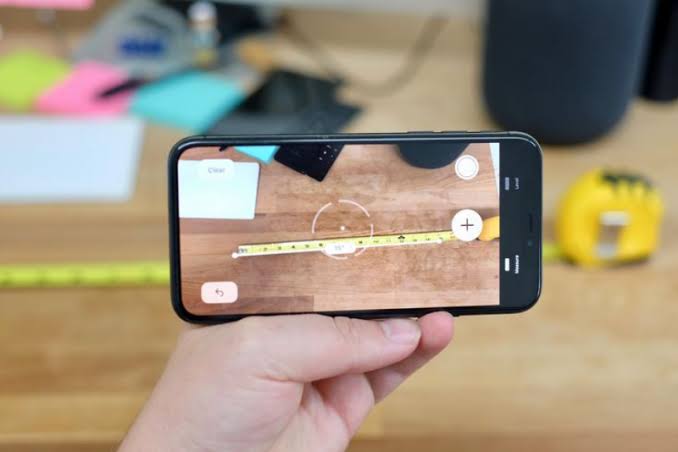
Measuring distances and dimensions has never been easier thanks to innovative digital measuring tape apps that turn your smartphone into a powerful measurement tool.
Whether you’re a professional contractor, interior designer, or someone planning a furniture purchase, measuring tape applications offer convenience that traditional tools simply can’t match. Gone are the days when you had to carry a bulky tape measure everywhere – your phone now handles the job with remarkable accuracy.
These smart tools leverage augmented reality (AR) technology and your device’s camera to calculate distances, heights, and areas in real-time. From measuring room dimensions for a renovation project to checking if that new couch will fit through your doorway, digital measuring solutions have transformed how we approach everyday measurement tasks.
📱 How Digital Measuring Tape Apps Actually Work
Modern measurement applications rely on sophisticated technology built into your smartphone. The primary method uses augmented reality combined with depth sensors found in newer phone models. When you point your camera at an object, the app analyzes the visual data and calculates distances based on reference points.


The process involves several key components working together seamlessly:
- Camera calibration: The app uses your device’s camera specifications to establish a baseline for measurements
- Motion tracking: Gyroscope and accelerometer sensors detect your phone’s movement and orientation
- Depth mapping: Advanced devices with LiDAR or dual cameras create 3D maps of the environment
- Computer vision algorithms: Software identifies edges, corners, and surfaces to determine measurement points
For devices without dedicated depth sensors, apps employ monocular vision techniques – essentially using single-camera input combined with movement to triangulate distances. While slightly less precise than LiDAR-equipped phones, these methods still deliver measurements accurate enough for most everyday applications.
The accuracy typically ranges from 1-3% margin of error on supported devices, which translates to about 1-3 centimeters per meter measured. Professional-grade apps can achieve even tighter tolerances when used correctly.
🎯 Practical Uses That Make Life Simpler
Digital measuring tools shine in countless real-world scenarios. Home improvement enthusiasts use them to calculate paint quantities by measuring wall areas precisely. One user reported saving over $100 by accurately measuring their living room and purchasing exactly the right amount of flooring material – no excess, no shortages.
Real estate agents have adopted these apps to quickly document property dimensions during site visits. Instead of juggling a clipboard, pen, and traditional tape measure, they simply point their phone and capture measurements instantly, often embedding them directly into listing photos.
Home Furnishing and Interior Design
Shopping for furniture becomes stress-free when you can measure available space on the spot. Before buying that dining table online, you can verify it fits your dining area, check clearance for chairs, and ensure walkway space remains adequate.
Interior designers leverage measurement apps to create accurate floor plans without hauling professional surveying equipment. They measure room layouts, window placements, and ceiling heights during initial client consultations, streamlining the design process significantly.
DIY Projects and Renovations
Homeowners tackling projects like installing shelving, building decks, or framing artwork benefit enormously from instant measurements. The ability to save and label measurements within the app creates a digital record that prevents the frustration of re-measuring the same space multiple times.
One particularly useful feature found in premium apps is the ability to calculate material requirements automatically. Measure your deck dimensions, and the app estimates how many boards, screws, and posts you’ll need based on standard construction practices.

🔧 Essential Features to Look For
Not all measuring apps offer the same capabilities. When choosing the right tool, prioritize these core functions that separate basic offerings from genuinely useful applications.
| Feature | Why It Matters | Best For |
|---|---|---|
| AR Measurement | Provides visual overlay showing measurements in real-time on your screen | Quick spot measurements, furniture shopping |
| Height Detection | Automatically calculates height of objects or people | Construction, room planning |
| Area & Volume Calculation | Computes square footage and cubic measurements | Flooring projects, shipping estimates |
| Photo Annotation | Saves measurements directly on captured images | Documentation, client presentations |
| Unit Conversion | Switches between metric and imperial measurements instantly | International projects, following foreign plans |
| Measurement History | Stores previous measurements for future reference | Ongoing projects, comparison shopping |
Export capabilities prove invaluable for professional use. Look for apps that can generate PDF reports, export to CAD programs, or share measurements via email and messaging apps. This functionality transforms your phone from a simple measuring device into a complete documentation system.
Advanced Capabilities Worth Considering
Some premium applications include level and angle detection, turning your device into a digital spirit level and protractor simultaneously. These tools help ensure shelves hang perfectly straight or that deck railings meet local building codes for slope requirements.
Floor plan creation features allow you to walk through a space while the app maps out the room layout automatically. This technology, once reserved for $1,000+ laser scanners, now exists in apps costing less than a coffee.
💡 Tips for Achieving Maximum Accuracy
Even the best measurement app requires proper technique to deliver reliable results. Environmental factors and user habits significantly impact precision, but following proven methods ensures consistent accuracy.
Lighting conditions play a crucial role in measurement quality. Well-lit environments with even illumination produce the most accurate results. Harsh shadows or extremely bright backlighting confuse the camera sensors, leading to errors. Early morning or late afternoon natural light often works better than overhead artificial lighting.
Steady hands make all the difference. When measuring, brace your elbows against your body or rest your phone hand on a stable surface. Many apps include stabilization indicators showing when you’ve held the device steady long enough for an accurate reading.
Calibration Techniques That Work
Most apps offer calibration functions that improve accuracy. Calibrate by measuring a known distance – perhaps a standard door frame (typically 32 or 36 inches) or a floor tile (usually 12 inches square). If the app’s reading differs from the actual measurement, adjust the calibration settings accordingly.
Recalibrate whenever you use a phone case of different thickness or after software updates. These changes can affect how the camera interprets distances, even if the differences seem minor.
Optimal Measuring Distance
Each app has a sweet spot for measurement distance. Generally, measuring objects 1-10 feet away produces the best results. Extreme close-ups (under 6 inches) or very long distances (over 30 feet) tend to accumulate more error.
For larger spaces, measure in segments rather than attempting one long measurement. Measure your room in 10-foot sections, then add the results. This approach typically delivers better accuracy than trying to capture a 40-foot wall in a single measurement.
📊 Comparing Digital vs. Traditional Measuring Tools
Physical tape measures still hold advantages in certain situations. They don’t require battery power, work in any lighting condition, and provide tactile feedback that some professionals prefer. For precision carpentry or critical measurements where tolerances matter to the millimeter, traditional tools remain the gold standard.
However, digital measuring apps excel in speed and convenience. Measuring a room’s dimensions takes 30 seconds with an app versus several minutes with a tape measure, especially when working alone. The ability to instantly calculate area, save measurements, and share results digitally creates workflow efficiencies that physical tools simply cannot match.
Cost comparison heavily favors digital solutions. A quality laser measure costs $100-$300, while professional-grade tape measures run $20-$50. Most measuring apps cost nothing or charge $5-$15 for premium features – a fraction of traditional tool prices.
When to Choose Each Type
Use traditional measuring tools for:
- Fine woodworking requiring 1/16-inch precision
- Professional construction where measurements affect structural integrity
- Environments with poor lighting or excessive dust
- Measuring flexible materials like fabric or rope
- Situations where battery life concerns exist
Digital apps work best for:
- Quick estimates and preliminary measurements
- Measuring spaces where physical access proves difficult (high ceilings, large open areas)
- Projects requiring documentation and sharing of measurements
- Shopping scenarios where you need immediate verification
- Area and volume calculations involving multiple dimensions
🛠️ Troubleshooting Common Measurement Issues
Users occasionally encounter inconsistent readings or app crashes. These problems usually stem from a handful of common causes with straightforward solutions.
Inconsistent measurements often result from camera lens smudges or scratches. Clean your camera lens with a microfiber cloth before measuring. Even minor fingerprint oils can distort the image processing algorithms enough to throw off calculations by several inches.
If measurements seem randomly inaccurate, check for software updates. Developers continually refine measurement algorithms, and running outdated versions means missing important accuracy improvements.
Handling Different Surface Types
Reflective surfaces like mirrors or glossy countertops confuse measurement algorithms. When measuring these materials, place a piece of painter’s tape on the surface to create a matte reference point. The app can lock onto the tape more reliably than the reflective material.
Very dark or very light surfaces also present challenges. Apps struggle to detect edges and corners on solid black or white objects. Adding contrast – perhaps placing a colored object near the measurement point – helps the software identify reference points more accurately.
Device Compatibility Considerations
Older smartphones lack the processing power and sensor quality for accurate AR measurements. Devices manufactured before 2017 may run measuring apps but deliver subpar results. Check the app’s compatibility requirements before expecting professional-grade accuracy from aging hardware.
Phone cases with raised edges around the camera can interfere with measurements, particularly for close-range work. Either remove the case for critical measurements or calibrate the app while wearing the case to compensate for the offset.
🌟 Professional Applications and Use Cases
Beyond casual home use, multiple industries have integrated measuring apps into standard workflows. Construction contractors use them for quick site assessments and client consultations, saving time on initial estimates while reserving precision tools for final measurements.
Property inspectors document foundation issues, roof dimensions, and structural concerns using measurement apps combined with annotated photos. This creates comprehensive reports without requiring multiple trips or excessive equipment.
Education and Learning Environments
Math and geometry teachers employ measuring apps as interactive learning tools. Students measuring classroom objects and calculating areas develop practical understanding of mathematical concepts. The immediate feedback and visual nature of AR measurements engage learners more effectively than traditional textbook problems.
Architecture students use measurement apps for preliminary site analysis before deploying professional surveying equipment. This speeds up the research phase while teaching proper measurement technique.
E-commerce and Retail Applications
Online sellers photograph items with embedded measurements, reducing customer inquiries about dimensions. This transparency decreases return rates and increases buyer confidence, particularly for furniture and large items where size matters significantly.
Customers shopping for appliances can measure installation spaces on-site, then verify compatibility with online product specifications immediately. This eliminates the guesswork and reduces the likelihood of purchasing an oversized refrigerator or dishwasher.
🔮 Future Developments in Measurement Technology
The measurement app landscape continues evolving rapidly. Emerging technologies promise even greater accuracy and functionality in the coming years.
LiDAR integration in mainstream smartphones represents the most significant recent advancement. This laser-based technology, once limited to professional surveying equipment costing thousands, now appears in consumer devices. LiDAR-enabled apps achieve accuracy within 1% under optimal conditions – rivaling dedicated laser measures.
Machine learning algorithms improve with each measurement taken. Apps increasingly recognize common objects (doors, windows, furniture) and automatically apply contextual knowledge to refine measurements. Over time, these systems learn to compensate for common environmental factors that traditionally introduce errors.
Integration with Smart Home Systems
Future development may connect measurement apps directly with smart home platforms and design software. Imagine measuring your living room and having paint color visualizers, furniture arrangement tools, and renovation cost estimators automatically populate with your exact dimensions.
Cloud-based measurement libraries could allow homeowners to maintain permanent digital records of their property dimensions, accessible during any project or when consulting with contractors. This eliminates repetitive measuring and creates valuable documentation for insurance and resale purposes.
✅ Making the Most of Your Measurement App
Success with digital measuring tools comes from understanding both their capabilities and limitations. These apps perform brilliantly for the vast majority of everyday measuring tasks while complementing rather than completely replacing traditional tools.
Start with simple projects to build confidence and learn your app’s quirks. Measure familiar objects with known dimensions to understand how environmental factors affect accuracy. This hands-on experience proves more valuable than any instruction manual.
Combine digital and traditional methods strategically. Use apps for quick measurements and area calculations, then verify critical dimensions with a physical tape measure before making final decisions. This hybrid approach leverages the strengths of both tool types.
Document everything. The ability to save, label, and organize measurements represents one of the biggest advantages over traditional tools. Create measurement sets for different rooms or projects, attach photos, and add notes about what you measured. Future you will appreciate this organization when referencing old measurements.
Remember that practice improves results dramatically. Your first measurements may vary slightly from physical tape measure readings, but consistent technique and familiarity with your chosen app quickly improve accuracy. Within a few sessions, you’ll develop an intuitive feel for optimal distance, lighting, and measurement approach.
The convenience of carrying a capable measuring tool everywhere your phone goes transforms how we approach measurement tasks. Whether you’re a professional contractor documenting job sites, a homeowner planning renovations, or someone who simply wants to verify that online furniture purchase will fit – measuring tape applications deliver practical value that enhances both productivity and decision-making confidence.
