
Anúncios
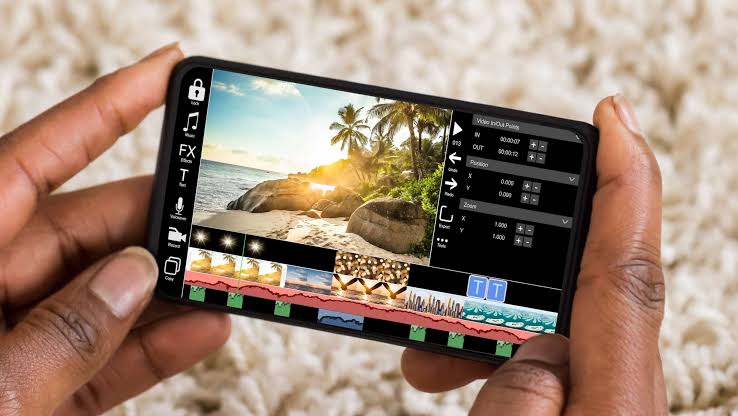
Creating stunning video content from your photos and favorite music has never been easier, thanks to modern mobile applications designed specifically for this purpose.
Whether you’re a social media enthusiast looking to share memorable moments or a small business owner wanting to create promotional content, video editing apps have democratized content creation. These powerful tools transform static images into dynamic visual stories, complete with transitions, effects, and perfectly synchronized soundtracks.
The beauty of these applications lies in their accessibility. You don’t need expensive equipment or professional training to produce eye-catching videos. With intuitive interfaces and pre-designed templates, anyone can craft professional-looking content directly from their smartphone or tablet within minutes.
🎬 Why Photo-to-Video Apps Are Transforming Content Creation
The shift from traditional video editing software to mobile applications represents a fundamental change in how we approach visual storytelling. Desktop programs like Adobe Premiere or Final Cut Pro remain industry standards for professional production, but they require significant investment in both money and learning time.


Mobile video creation apps bridge this gap by offering simplified workflows without sacrificing creative potential. According to recent statistics, over 78% of video content shared on platforms like Instagram and TikTok is created or edited on mobile devices.
These applications excel in several key areas:
- Speed: Complete projects in minutes rather than hours
- Accessibility: Edit anywhere, anytime without being tied to a desk
- Cost-effectiveness: Many robust features available for free or minimal subscription fees
- Social integration: Direct sharing to multiple platforms with optimized formats
- Template libraries: Pre-built styles for common video types like birthday slideshows, business promos, or travel montages
🔍 Essential Features to Look for in Video Creation Apps
Not all photo slideshow and music video apps are created equal. Understanding which features matter most will help you choose the right tool for your specific needs.
Smart Photo Selection and Organization
Top-tier applications use intelligent algorithms to scan your photo library and suggest the best images based on quality, facial recognition, and composition. This feature alone can save hours when working with large photo collections from events or trips.
Advanced apps also offer chronological sorting, location-based grouping, and the ability to manually curate your selection with drag-and-drop simplicity.
Music Library and Audio Controls
The soundtrack can make or break your video. Quality applications provide access to:
- Royalty-free music libraries categorized by mood, genre, and tempo
- Integration with your personal music collection
- Precise audio trimming to match your desired video length
- Beat detection that syncs transitions with musical rhythms
- Volume controls and fade effects
- Voice recording capabilities for narration
Transition Effects and Visual Enhancements
Smooth transitions between photos create professional polish. Look for apps offering at least 15-20 different transition styles, including fades, wipes, slides, and zoom effects.
Beyond basic transitions, premium features might include:
- Ken Burns effect (slow pan and zoom on static images)
- Color grading and filter presets
- Text overlay with customizable fonts and animations
- Stickers and emoji integration
- Adjustment controls for brightness, contrast, and saturation
📱 Top Applications Worth Downloading Today
The market offers dozens of options, each with unique strengths. Here’s a breakdown of applications that consistently receive high ratings and deliver genuine value.
InShot: The All-in-One Powerhouse
With over 100 million downloads on Android alone, InShot has earned its reputation as a versatile editing solution. The app excels at combining photos with music while offering robust video editing capabilities for mixed-media projects.
Key strengths include: intuitive timeline editing, extensive music library, professional-grade color filters, and text animation options. The free version provides substantial functionality, though a watermark appears on exported videos unless you upgrade.
PhotoGrid: Template-Focused Creation
PhotoGrid stands out for users who prefer guided creation over freeform editing. The app offers hundreds of pre-designed templates for specific occasions—birthdays, weddings, business promotions, fitness journeys, and more.
Simply select your template, add photos, customize text and music, then export. This approach works brilliantly for users who want polished results without spending time on design decisions.

Quik by GoPro: Automatic Magic
GoPro’s Quik takes automation to the next level. The app analyzes your selected photos and video clips, identifies the best moments, and automatically generates a complete video synced to your chosen music—all within seconds.
While this hands-off approach limits creative control, it’s perfect for quick social media posts or when you need decent results with minimal effort. You can always adjust the automatic creation with manual editing afterward.
🎨 Creative Techniques for Standout Videos
Having the right app is only the beginning. Applying proven creative techniques separates amateur-looking slideshows from compelling visual narratives.
The Rule of Threes in Photo Selection
Professional editors often structure sequences in groups of three: establish a scene, provide detail, then show context or reaction. This rhythm creates natural flow that viewers find satisfying.
For example, in a vacation video: wide shot of the beach (establishment), close-up of seashells (detail), photo of your family enjoying the moment (context). Repeat this pattern throughout your video for cohesive storytelling.
Strategic Music Selection
Your soundtrack should complement, not overwhelm, your visual content. Consider these guidelines:
| Video Type | Music Recommendation | Tempo Range (BPM) |
|---|---|---|
| Family memories | Uplifting acoustic, soft pop | 90-110 |
| Business promotion | Corporate upbeat, modern electronic | 120-130 |
| Travel montage | Adventurous, world music | 110-125 |
| Romantic slideshow | Classical, romantic ballads | 60-80 |
| Fitness progress | Energetic rock, hip-hop | 130-150 |
Duration Sweet Spots for Different Platforms
Platform algorithms and user behavior patterns favor specific video lengths. Optimize your content accordingly:
- Instagram Feed: 30-60 seconds (maximum engagement)
- Instagram Stories: 15 seconds per segment
- TikTok: 15-21 seconds (though 60+ seconds now supported)
- Facebook: 60-90 seconds (sweet spot for shares)
- YouTube: 2-5 minutes (allows proper storytelling while maintaining attention)
💡 Advanced Tips for Professional-Looking Results
Once you’ve mastered the basics, these advanced techniques will elevate your video creation skills to a new level.
Color Grading for Emotional Impact
Consistent color treatment across all photos creates visual cohesion. Most quality apps offer preset filters, but manual adjustment provides better results.
Warm tones (increased yellow/orange) evoke nostalgia, comfort, and happiness—perfect for family content. Cool tones (increased blue) suggest professionalism, calmness, or modernity—ideal for business presentations. High contrast with vibrant saturation creates energy and excitement.
Apply the same color grade to every photo in your sequence for a unified aesthetic that appears intentional rather than random.
Text Overlay Best Practices
Adding text to your videos increases engagement, especially since many users watch social media content without sound. Follow these principles:
- Keep messages under 6 words for easy reading
- Use high-contrast colors (white text on dark backgrounds or vice versa)
- Position text in the safe zone (center third of the screen)
- Animate text entries and exits rather than static placement
- Match font personality to your content (playful for casual, serif for formal)
Strategic Photo Sequencing
The order of your images matters tremendously. Rather than chronological placement, consider emotional arc. Start with an attention-grabbing image, build through the middle with supporting content, and end with your strongest photo or call-to-action.
Professional editors often save their second-best photo for the beginning and their absolute best for the final frame, ensuring strong first impressions and memorable conclusions.
🚀 Monetizing Your Video Creation Skills
As you develop proficiency with these applications, opportunities for income generation emerge. Thousands of creators have built side businesses or full-time careers around mobile video editing.
Local Business Partnerships
Small businesses desperately need video content for social media but often lack the skills or time to create it themselves. Offer packages for:
- Monthly social media content (4-8 videos)
- Event coverage and highlight reels
- Product showcase videos
- Testimonial compilation videos
- Behind-the-scenes content
Starting rates typically range from $50-$150 per video, depending on your market and complexity. As you build a portfolio, premium clients will pay $300+ for quality work.
Template Creation and Sales
Platforms like Etsy, Creative Market, and Envato allow creators to sell video templates. If you develop unique transitions, title sequences, or complete template packages, this passive income stream can generate consistent revenue.
Successful template creators report earning $500-$2,000 monthly after building a catalog of 20-30 products.
Educational Content and Courses
Once you’ve mastered specific techniques or applications, teaching others becomes viable. Create YouTube tutorials (which generate ad revenue), offer paid online courses through platforms like Udemy or Skillshare, or provide one-on-one coaching sessions.
⚡ Troubleshooting Common Challenges
Even the best applications present occasional obstacles. Here’s how to overcome the most frequent issues.
Export Quality Problems
If your exported videos look pixelated or blurry despite high-quality source photos, check these settings:
- Ensure export resolution is set to 1080p minimum (4K for future-proofing)
- Verify the bitrate setting—higher numbers mean better quality (8-12 Mbps for HD)
- Avoid excessive digital zoom on photos, which reduces quality
- Check that your source images are high-resolution (minimum 1920×1080 pixels)
Audio Synchronization Issues
When music doesn’t align properly with your visuals, the problem usually stems from improper project setup. Before adding photos, set your desired total video length, then import music and trim it to match exactly. Add photos afterward, adjusting their individual display durations to fill the timeline.
Most apps also offer a “sync to beat” feature that automatically aligns transition points with musical beats—activate this for instant improvement.
Storage and Performance Constraints
Video editing is resource-intensive. If your app crashes or runs slowly:
- Close all background applications before editing
- Clear your app cache regularly
- Work with compressed copies of large image files
- Render longer projects in sections, then combine them
- Ensure at least 2GB of free storage space on your device
🌟 Future Trends in Mobile Video Creation
The technology powering these applications continues evolving rapidly. Understanding emerging trends helps you stay ahead and adopt powerful new capabilities early.
AI-Powered Editing Assistance
Artificial intelligence is transforming video creation through features like automatic subject detection, intelligent cropping for different aspect ratios, and content-aware effects that adjust based on what appears in each photo.
Newer applications can analyze faces and apply beauty filters automatically, remove backgrounds without green screens, and even suggest which photos work best together based on composition and color harmony.
3D Effects and Depth Mapping
Advanced smartphones now capture depth information alongside standard images. Video apps are leveraging this data to create realistic 3D effects, parallax movements, and selective focus adjustments—all from regular photos.
This technology allows creators to add professional-looking depth-of-field effects and cinematic camera movements that previously required specialized equipment.
Cross-Platform Cloud Editing
Cloud-based workflows are becoming standard, allowing you to start a project on your phone during your commute, continue editing on a tablet at home, and make final adjustments on a desktop computer—all with automatic synchronization.
This flexibility removes device limitations and enables collaboration, where multiple people can contribute to the same video project simultaneously.
✨ Maximizing Your Creative Potential
The best video creation application is ultimately the one you’ll actually use consistently. Start with free versions to explore interfaces and workflows, then invest in premium features once you’ve identified your preferred tool.
Remember that technical skills develop through practice. Your first few videos likely won’t meet your expectations—this is completely normal. Professional creators emphasize that consistent output beats perfect execution. Creating one video weekly for three months will teach you more than reading dozens of tutorials.
Experiment with different styles, study videos you admire, and don’t hesitate to recreate effects you’ve seen elsewhere. Creativity builds on existing ideas, and every professional creator started by imitating others before developing their unique voice.
The democratization of video creation through mobile applications has opened opportunities previously available only to those with expensive equipment and specialized training. Whether you’re preserving family memories, building a social media presence, or launching a creative business, these powerful tools put professional-quality video production literally in the palm of your hand.
Start creating today, and you’ll be amazed at what you can achieve with just photos, music, and the right application guiding your creativity. 🎥
