Anúncios
Managing a cluttered inbox can be overwhelming, but the right app can transform your email experience into something efficient and stress-free.
Every day, millions of people wake up to hundreds or even thousands of unread emails filling their inboxes. Promotional messages, newsletters, spam, and outdated notifications accumulate faster than we can process them. This digital chaos doesn’t just waste time—it creates anxiety and reduces productivity.
Fortunately, specialized applications designed to clean and organize your email inbox have emerged as powerful solutions. These tools use intelligent algorithms to identify, categorize, and remove unwanted messages, helping you reclaim control over your digital communication and focus on what truly matters.
📧 Why Your Inbox Needs Professional Cleaning
The average professional receives over 120 emails daily, according to recent workplace studies. Without proper management, this constant influx creates a digital landfill that becomes increasingly difficult to navigate.
An overloaded inbox affects more than just organization. Research shows that email clutter contributes to decision fatigue, increased stress levels, and decreased work performance. When you can’t find important messages quickly, opportunities get missed and relationships suffer.
Beyond the psychological impact, there are practical concerns. Email accounts have storage limits, and accumulated messages can slow down your email client or even prevent you from receiving new messages. Additionally, buried among thousands of emails might be security threats, phishing attempts, or subscription renewals you forgot to cancel.
🎯 What Makes a Great Email Cleaning Application
Not all email management tools are created equal. The best applications combine powerful features with user-friendly interfaces that make inbox maintenance effortless rather than overwhelming.
Smart Categorization and Filtering
Top-tier email cleaning apps use artificial intelligence to automatically recognize different types of messages. They can distinguish between personal correspondence, work-related emails, newsletters, social media notifications, and promotional content without requiring extensive manual setup.
This intelligent sorting happens in the background, creating organized folders or labels that help you process emails in batches rather than one-by-one. You might review all your newsletters together during a coffee break, for instance, rather than having them scattered throughout your inbox.
Bulk Actions That Save Hours
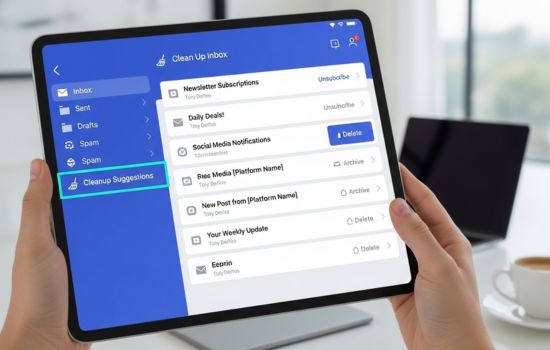
One of the most valuable features in email cleaning applications is the ability to perform bulk actions. Instead of manually selecting and deleting hundreds of individual messages, you can remove entire categories with a few taps.
Quality apps allow you to unsubscribe from multiple mailing lists simultaneously, archive old conversations by date range, and delete messages from specific senders across months or years of accumulated email.

Privacy and Security Considerations
When granting an application access to your email, security must be a top priority. Reputable email cleaning apps use read-only access when possible and employ bank-level encryption to protect your data.
The best services are transparent about their data practices, clearly stating whether they store your emails on their servers or process them locally on your device. Look for apps that comply with international privacy standards like GDPR and have undergone independent security audits.
✨ Key Features to Look For
When evaluating email cleaning applications, certain features separate exceptional tools from mediocre ones. Understanding these capabilities helps you choose the right solution for your specific needs.
Automatic Screening and Sorting
The most effective apps work continuously in the background, screening new messages as they arrive and automatically applying your preferred rules. This proactive approach prevents clutter from accumulating in the first place.
Advanced screening can identify messages from new senders and ask whether you want to receive future emails from them. This feature alone can dramatically reduce inbox noise over time.
Unsubscribe Management
Manually unsubscribing from unwanted mailing lists is tedious and time-consuming. Quality email cleaning apps identify all your subscriptions and present them in a manageable list where you can unsubscribe from dozens of services with a single action.
Some applications even track which unsubscribe requests were successful and which senders continue sending messages despite your request, allowing you to create blocking rules for persistent offenders.
Search and Filter Capabilities
Powerful search functions let you find messages based on multiple criteria simultaneously—sender, date range, attachment type, message size, and keywords. This capability becomes essential when you need to locate specific information buried in years of correspondence.
Advanced filters can identify patterns you might not notice manually, such as messages from senders you’ve never responded to or emails containing unread attachments from months ago.
🚀 How Email Cleaning Apps Transform Your Workflow
Installing an email cleaning application isn’t just about removing messages—it’s about fundamentally changing how you interact with email and reclaiming time for more meaningful work.
From Reactive to Proactive Email Management
Most people approach email reactively, constantly checking for new messages and responding to whatever arrives. This interrupt-driven workflow destroys focus and productivity.
With a well-configured cleaning app, you shift to a proactive approach. Important messages get prioritized automatically, while less urgent items get batched for processing during designated times. This structure reduces stress and increases your ability to focus deeply on important tasks.
Reclaiming Digital Space and Mental Clarity
There’s something psychologically liberating about seeing “Inbox: 0” instead of “Inbox: 3,847.” Email cleaning apps make achieving and maintaining inbox zero realistic rather than fantasy.
Users consistently report feeling less anxious and more in control after cleaning their inboxes. The mental burden of knowing thousands of unprocessed messages are waiting for you disappears, replaced by confidence that your system is handling the noise.
📱 Cross-Platform Synchronization and Accessibility
Modern professionals access email from multiple devices throughout the day—smartphones, tablets, laptops, and desktop computers. The best email cleaning applications work seamlessly across all these platforms.
Cloud-based synchronization ensures that actions taken on one device immediately reflect on all others. Delete a batch of promotional emails on your phone during your commute, and they’re gone from your desktop when you arrive at work.
This consistency prevents the frustrating experience of cleaning your inbox on one device only to find the clutter still exists elsewhere. It also means your organizational rules and preferences follow you regardless of which device you’re using.
💡 Smart Strategies for Maximum Email Efficiency
An email cleaning app is a powerful tool, but combining it with smart strategies multiplies the benefits and creates lasting improvements to your digital life.
The Initial Deep Clean
When first using an email cleaning application, resist the temptation to carefully review every old message. Instead, acknowledge that emails older than a certain date (perhaps 90 days) that you haven’t already acted on are unlikely to require action now.
Archive or delete these messages in bulk based on categories. If something truly important resurfaces, the sender will typically reach out again. This approach might feel uncomfortable initially, but the freedom it creates is worth the minor risk.
Creating Sustainable Habits
Cleaning your inbox once creates temporary relief, but lasting change requires establishing new habits. Use your app’s automation features to maintain cleanliness without ongoing manual effort.
Set up rules that automatically handle predictable message types. Receipts can go directly to a designated folder, social media notifications can be auto-archived after three days, and newsletters can accumulate in a weekly reading folder.
Regular Maintenance Schedules
Even with excellent automation, periodic manual review keeps your system optimized. Schedule a brief weekly session to review your filters, unsubscribe from new unwanted senders, and adjust rules based on changing patterns.
These maintenance sessions take just minutes when performed regularly but prevent the gradual slide back into chaos that happens when systems go unmonitored for months.
🔒 Protecting Your Data While Cleaning
Granting third-party applications access to your email requires trust and due diligence. Understanding how to protect your information while using cleaning apps is essential.
Always review the permissions an app requests before installation. Legitimate email cleaning tools need read access to analyze your inbox, but they shouldn’t require permissions unrelated to email management, like access to your contacts or camera.
Enable two-factor authentication on your email accounts before connecting third-party apps. This additional security layer protects your account even if app credentials were somehow compromised.
Regularly review which applications have access to your email through your account security settings. Remove access for apps you no longer use, and verify that current apps still align with your privacy expectations.
🌟 Real-World Results and User Experiences
The true measure of any tool is the results it delivers for real users facing genuine challenges. Email cleaning applications have transformed inbox management for millions of people worldwide.
Professionals report saving 30-60 minutes daily after implementing automated email cleaning systems. This time savings compounds over weeks and months into dozens of reclaimed hours that can be redirected toward meaningful work or personal pursuits.
Beyond time savings, users consistently mention reduced stress and improved focus. Knowing that their inbox is managed by intelligent systems rather than requiring constant manual attention provides psychological relief that enhances overall well-being.
Small business owners particularly benefit from these tools, as email often represents a major communication channel with customers. Keeping business inboxes organized ensures no customer inquiry gets lost in clutter, improving service quality and customer satisfaction.
🎁 Advanced Features That Make the Difference
While basic email cleaning functions provide significant value, advanced features available in premium applications take inbox management to the next level.
Smart Reminders and Follow-Up Tracking
Some applications can identify messages that appear to require follow-up action and automatically create reminders. If someone asks you a question and you haven’t responded within a certain timeframe, the app can notify you, preventing important communications from being forgotten.
Analytics and Insights
Understanding your email patterns helps optimize your workflow. Advanced apps provide analytics showing who emails you most frequently, what times of day you receive the most messages, and how quickly you typically respond to different types of correspondence.
These insights reveal opportunities for improvement, like identifying subscriptions you thought you’d cancelled or senders who consistently send messages you ignore, suggesting it’s time to unsubscribe or create a filter.
Email Scheduling and Send Later Features
While primarily cleaning tools, many apps include composition features like scheduled sending. This allows you to write responses when it’s convenient but schedule delivery for optimal timing, such as during business hours rather than late at night.
🔄 Making the Transition to Cleaner Email
Adopting an email cleaning application represents a transition in how you manage digital communication. Making this change smoothly ensures you gain maximum benefit with minimum disruption.
Start by installing the app and allowing it to analyze your inbox without immediately taking action. Review its suggestions and understand what it’s identifying before authorizing bulk deletions or unsubscribes.
Begin with conservative automation rules and gradually increase aggressiveness as you gain confidence in the system. It’s better to manually handle a few messages initially than to accidentally delete something important with overly aggressive filters.
Give yourself permission to experiment and adjust. Your ideal email management system is personal and might require several iterations before it feels perfect. Most apps allow you to undo actions, so don’t fear making mistakes during the learning process.
✅ Choosing the Right App for Your Needs
With numerous email cleaning applications available, selecting the right one depends on your specific requirements, email volume, and technical comfort level.
Consider whether you need support for multiple email accounts or just one. Professionals managing several accounts for different purposes need apps that can handle multiple profiles seamlessly.
Evaluate whether you prefer a mobile-first experience or need robust desktop functionality. Some apps excel on smartphones with intuitive touch interfaces, while others provide more powerful features on computers with larger screens.
Budget is another factor. Many excellent free options exist for basic inbox cleaning, while premium subscriptions unlock advanced features like unlimited unsubscribes, priority support, and enhanced automation. Assess whether the time savings justify the subscription cost for your situation.
🌈 The Future of Email Management
Email cleaning technology continues evolving rapidly, with artificial intelligence and machine learning enabling increasingly sophisticated inbox management.
Future developments will likely include even more predictive capabilities, with apps learning your preferences so thoroughly they can make decisions with minimal input. Imagine systems that automatically draft responses to routine inquiries or schedule meetings based on natural language requests in emails.
Integration with other productivity tools will deepen, creating unified systems where your email, calendar, task manager, and note-taking apps work together seamlessly. An email mentioning a deadline could automatically create a calendar event and task reminder without manual intervention.
Privacy-focused innovations will also emerge as users demand greater control over their data. Expect to see more apps processing emails entirely on-device rather than in the cloud, combining powerful cleaning features with maximum privacy protection.
Taking control of your inbox with a dedicated cleaning application isn’t just about organization—it’s about reclaiming your time, reducing stress, and creating space for what matters most. The overwhelm you feel facing thousands of unread messages can transform into confidence and clarity with the right tools and strategies. Your future self will thank you for taking this step toward digital wellness today.
