
Anúncios
Struggling to hear your phone’s audio clearly? Whether it’s music, calls, or videos, low volume can be frustrating and limit your mobile experience significantly.
Modern smartphones pack incredible technology into compact devices, but sometimes the built-in speakers just don’t deliver enough power. This becomes especially noticeable in noisy environments, during group video calls, or when you’re trying to share content with friends without external speakers.
Fortunately, specialized volume booster apps can push your device’s audio capabilities beyond factory settings, unlocking hidden potential and delivering crystal-clear sound at higher levels. Let’s explore how these applications work and which features matter most for an optimal listening experience.
🔊 Why Your Phone’s Default Volume Might Not Be Enough
Smartphone manufacturers typically limit maximum volume levels for several reasons. Safety regulations, speaker protection, and battery conservation all play roles in these restrictions. While these precautions make sense from a technical standpoint, they often leave users wanting more power.
Standard volume controls operate within predetermined boundaries set by the operating system. These limits prevent potential hardware damage but don’t account for individual user needs or specific environmental challenges. When you’re outdoors, in a crowded space, or dealing with hearing difficulties, those factory settings quickly become inadequate.
Volume booster applications work by optimizing the audio output signal before it reaches your speakers. They apply intelligent amplification techniques that maximize sound without causing distortion or damaging your device’s components. This software-based approach offers flexibility that hardware limitations can’t provide.


🎯 Key Features to Look for in Volume Booster Apps
Not all volume enhancement applications deliver the same quality or functionality. Understanding which features matter most helps you choose the right tool for your specific needs and ensures you get maximum value from your download.
Safe Amplification Technology
The best volume booster apps incorporate intelligent algorithms that increase sound levels without pushing your speakers into dangerous territory. They monitor output in real-time, applying dynamic adjustments that prevent clipping and distortion while maximizing clarity.
Look for applications that offer customizable boost levels rather than just a simple on/off switch. This granular control allows you to find the perfect balance between volume and sound quality for different situations and content types.
Universal Compatibility Across Media Types
Premium volume boosters work seamlessly with all audio sources on your device. Whether you’re streaming music, watching videos, taking calls, or playing games, the amplification should apply consistently without requiring manual adjustments for each app.
Some advanced applications even offer profile-based settings, letting you create custom configurations for specific scenarios. You might want maximum boost for outdoor use but gentler enhancement for late-night listening.
Equalizer and Sound Customization
Beyond simple volume increase, sophisticated apps include equalizer functionality that lets you shape your audio profile. Bass boost, treble enhancement, and preset sound profiles for different genres add another dimension to your listening experience.
These tools compensate for inherent weaknesses in smartphone speakers, which often struggle with low frequencies and can sound tinny at higher volumes. Proper equalization makes boosted audio sound richer and more balanced.
📱 How Volume Booster Apps Actually Work
Understanding the technology behind these applications demystifies their functionality and helps you use them more effectively. The process involves several sophisticated techniques working together to enhance your audio output.
When you play audio on your phone, the digital signal passes through various processing stages before reaching your speakers. Volume booster apps intercept this signal chain, applying amplification and optimization algorithms at the software level before the final output stage.

This software-based approach means you’re not physically modifying your hardware or voiding warranties. Instead, you’re optimizing how your existing components process and deliver sound. The apps work within your device’s capabilities while removing artificial restrictions that manufacturers imposed.
Advanced applications use dynamic range compression, which reduces the difference between the quietest and loudest parts of audio. This technique makes everything more audible without requiring constant volume adjustments, particularly useful for dialogue-heavy content or music with varying intensity.
🚀 Maximizing Performance While Protecting Your Device
While volume booster apps are safe when used properly, understanding best practices ensures longevity for both your speakers and your hearing. Smart usage combines enhanced audio enjoyment with responsible volume management.
Start Gradually and Test Different Levels
When first installing a volume booster, resist the temptation to immediately max out all settings. Begin with modest increases of 10-20% above normal maximum volume, then gradually adjust upward only if needed. This measured approach helps you identify the sweet spot where volume and quality intersect.
Different content types respond differently to boosting. Speech-based audio like podcasts or audiobooks typically handles amplification better than bass-heavy music. Test various media to understand how your chosen app performs across different scenarios.
Monitor for Distortion and Adjust Accordingly
Your ears provide the best feedback mechanism. If you notice crackling, buzzing, or muddy sound quality, you’ve pushed beyond optimal levels. Reduce the boost incrementally until clarity returns. Quality should never be sacrificed for mere loudness.
Many premium apps include visual indicators showing when you’re approaching distortion thresholds. Pay attention to these warnings—they’re designed to protect both your listening experience and your hardware from unnecessary stress.
Take Regular Breaks from Maximum Volume
Extended exposure to high volume levels can cause hearing fatigue and potentially permanent damage. Follow the 60/60 rule: listen at no more than 60% of maximum volume for no longer than 60 minutes at a time, then give your ears a rest.
Volume booster apps make it easy to exceed safe listening levels without realizing it. Be mindful of duration as well as intensity, especially when using headphones or earbuds where sound is directed straight into your ear canal.
🎵 Specific Scenarios Where Volume Boosters Shine
Certain situations particularly benefit from enhanced audio capabilities. Understanding these use cases helps you appreciate the versatility that volume booster applications bring to your mobile experience.
Outdoor Activities and Noisy Environments
Whether you’re at the beach, on a hiking trail, or hosting a backyard gathering, ambient noise competes with your phone’s speakers. A quality volume booster cuts through environmental sounds, making your music or podcast audible without straining to hear.
These apps transform your smartphone into a surprisingly capable portable speaker for small gatherings. While they won’t replace dedicated Bluetooth speakers for large events, they provide convenient audio enhancement when you don’t have additional equipment available.
Older Devices with Degraded Speakers
Smartphone speakers naturally degrade over time from dust accumulation, physical wear, and component aging. Before investing in repairs or a new device, try a volume booster app to compensate for reduced output from aging hardware.
This software solution often extends the functional life of older phones, letting you postpone expensive upgrades while maintaining acceptable audio performance for daily tasks.
Accessibility and Hearing Assistance
For users with hearing challenges, standard volume levels may be inadequate even in quiet environments. Volume booster apps serve as accessibility tools, making smartphones more usable without requiring expensive specialized devices or hearing aids.
The ability to amplify phone calls, notifications, and alarms ensures important communications aren’t missed. This functionality adds genuine value beyond entertainment purposes, making these apps essential tools for many users.
⚡ Installation and Setup: Getting Started Quickly
Most volume booster applications feature straightforward installation processes, but knowing what to expect streamlines your setup and gets you enjoying enhanced audio faster.
After downloading from your device’s official app store, the initial launch typically requests various permissions. These usually include access to audio settings, notification controls, and sometimes overlay permissions for floating controls. These permissions are necessary for the app to function properly and don’t pose security risks when downloading from legitimate sources.
First-time setup often includes a brief tutorial explaining key features and controls. Take a moment to complete this walkthrough—it highlights important safety features and customization options you might otherwise overlook.
Many apps offer quick presets for common scenarios like “Music,” “Movies,” “Calls,” or “Outdoor.” These provide excellent starting points before you dive into manual customization. Test each preset to understand how they affect your audio, then select the one closest to your preferences as your baseline.
🛡️ Safety Considerations and Common Misconceptions
Despite their usefulness, volume booster apps sometimes face skepticism. Addressing common concerns and misconceptions helps you use these tools confidently and responsibly.
Will These Apps Damage My Speakers?
Reputable volume booster applications include safeguards that prevent hardware damage. They operate within safe parameters, using software optimization rather than forcing components beyond design specifications. The risk to your speakers is minimal when using quality apps at reasonable boost levels.
That said, consistently running any speakers at absolute maximum capacity does accelerate wear. The same principle applies whether you’re using boosted volume or not—moderation preserves longevity.
Do Volume Boosters Drain Battery Faster?
Audio processing requires computational resources, so volume booster apps do consume some additional battery power. However, the impact is typically modest—most users won’t notice significant differences in daily battery life.
Modern applications optimize their processing efficiency, running only when actively playing audio rather than constantly running in the background. This smart resource management minimizes battery impact while maintaining functionality.
Are There Legal or Privacy Concerns?
Legitimate volume booster apps from official app stores undergo security reviews and comply with platform guidelines. They don’t typically collect sensitive personal information beyond basic usage analytics that help developers improve functionality.
Always download from official sources like Google Play Store or Apple App Store rather than third-party websites. This ensures you’re getting verified, safe applications rather than potentially malicious software disguised as helpful tools.
🔧 Troubleshooting Common Issues
Even well-designed apps occasionally encounter problems. Knowing how to address common issues saves frustration and keeps your enhanced audio experience running smoothly.
If you notice the boost isn’t applying consistently, check that the app has all necessary permissions enabled in your device settings. Permission restrictions often cause intermittent functionality, especially after system updates that reset certain access rights.
Distorted or crackling audio usually indicates excessive boosting. Reduce the enhancement level incrementally until sound quality improves. Remember that different content types and speakers have varying tolerance for amplification.
Apps that stop working after phone calls or when switching between audio sources may have compatibility issues with your device’s audio routing. Look for app updates that address these conflicts, or try alternative applications if problems persist.
Battery optimization features on some Android devices can interfere with volume booster functionality by restricting background processes. Adding your chosen app to the battery optimization exclusion list often resolves this issue.
💡 Alternative Methods to Enhance Phone Audio
While dedicated apps offer the most convenient solution, other approaches can supplement or complement software-based volume boosting for even better results.
Physical amplification methods like cupping your hand around your speaker or placing your phone in a bowl create acoustic enhancement through resonance and reflection. These zero-cost techniques work surprisingly well for quick boosts in informal settings.
Regular speaker maintenance keeps your audio output at optimal levels. Gently cleaning speaker grilles with a soft brush removes accumulated dust and debris that muffle sound. This simple maintenance often restores volume you didn’t realize you’d lost.
Enabling developer options on Android devices sometimes reveals hidden audio settings that provide modest volume increases without additional apps. This approach requires technical comfort but offers another avenue for enhancement.
External Bluetooth speakers remain the ultimate solution for situations requiring truly powerful audio. Pairing your phone with even an inexpensive portable speaker delivers volume and quality that exceeds what any software enhancement can achieve with built-in speakers.
🌟 Choosing the Right Volume Booster for Your Needs
The ideal volume enhancement app depends on your specific requirements, device type, and primary use cases. Consider these factors when selecting from available options.
Free applications typically include advertisements and may limit advanced features. They work well for occasional use or testing whether volume boosting meets your needs. Premium versions remove ads and unlock comprehensive customization options worth considering if you’ll use the functionality regularly.
User reviews provide valuable insights into real-world performance. Look for consistent patterns in feedback rather than isolated complaints. Apps with thousands of positive reviews and regular updates demonstrate developer commitment to quality and compatibility.
Device-specific optimization matters more than you might think. Some apps perform exceptionally well on Samsung devices but struggle on Xiaomi phones, or vice versa. When possible, choose applications that explicitly mention compatibility with your specific device model.
Interface design affects daily usability significantly. An app with powerful features buried in confusing menus becomes frustrating quickly. Prioritize intuitive controls and clear visual feedback that make adjustments effortless even when you’re multitasking.
🎊 Enhancing Your Overall Audio Experience
Volume booster apps represent just one component of excellent mobile audio. Combining them with other optimization strategies creates a comprehensive approach to sound quality.
Audio streaming quality settings directly impact how good boosted sound can be. Higher bitrate streaming from services like Spotify or Apple Music provides better source material, which amplification enhances more effectively than low-quality compressed audio.
Format matters too—lossless audio formats preserve more detail than heavily compressed MP3s. When possible, choose higher-quality sources for content you’ll amplify, as boosting also amplifies compression artifacts in poor-quality files.
Experimenting with your phone’s built-in audio enhancements alongside third-party volume boosters sometimes yields excellent results. Features like Dolby Atmos, equalizers, or sound profiles complement amplification apps, creating richer overall audio than either approach alone.
Regular software updates for both your device and your volume booster app ensure optimal performance and compatibility. Developers continuously refine algorithms and address bugs that affect audio quality or functionality.
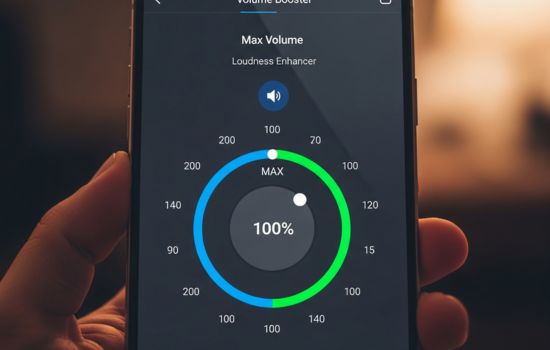
🎯 Making the Most of Your Enhanced Audio
With your volume booster properly configured, you’re ready to enjoy significantly improved audio across all your mobile activities. The difference becomes especially apparent in challenging listening environments where standard volume falls short.
Sharing media with friends becomes more viable without external speakers. Whether it’s showing videos, playing music, or presenting content, your phone’s enhanced output makes group experiences more enjoyable and inclusive.
Phone calls gain clarity and audibility, reducing the frustration of asking people to repeat themselves or straining to hear in less-than-ideal acoustic environments. This practical benefit often proves more valuable than entertainment applications.
Notification and alarm volume increases ensure you don’t miss important alerts. For heavy sleepers or those working in loud environments, this enhanced volume can literally be a wake-up call that standard settings couldn’t provide.
The confidence of knowing your phone can deliver powerful, clear audio when needed transforms how you use your device. You’ll find yourself relying on external speakers less frequently and appreciating your smartphone’s versatility more fully.
Volume booster applications unlock hidden potential in your device, transforming adequate audio into impressive performance. With smart usage and proper configuration, these tools enhance your mobile experience substantially while maintaining safety for both your hardware and your hearing.
